Leads, not just visits
Phone taps and email clicks are counted automatically, and one line counts contact forms and quote requests. You see the share of visitors who got in touch.
Pulse is the private website tracker I built for my own sites. It shows the things a trade business actually cares about: who called, who sent a message, and where they found you. Now you can run it on yours. Free, no monthly fee, and the data never leaves your own server.
No cookiesNo stored IP addressesWorks on regular cPanel hosting
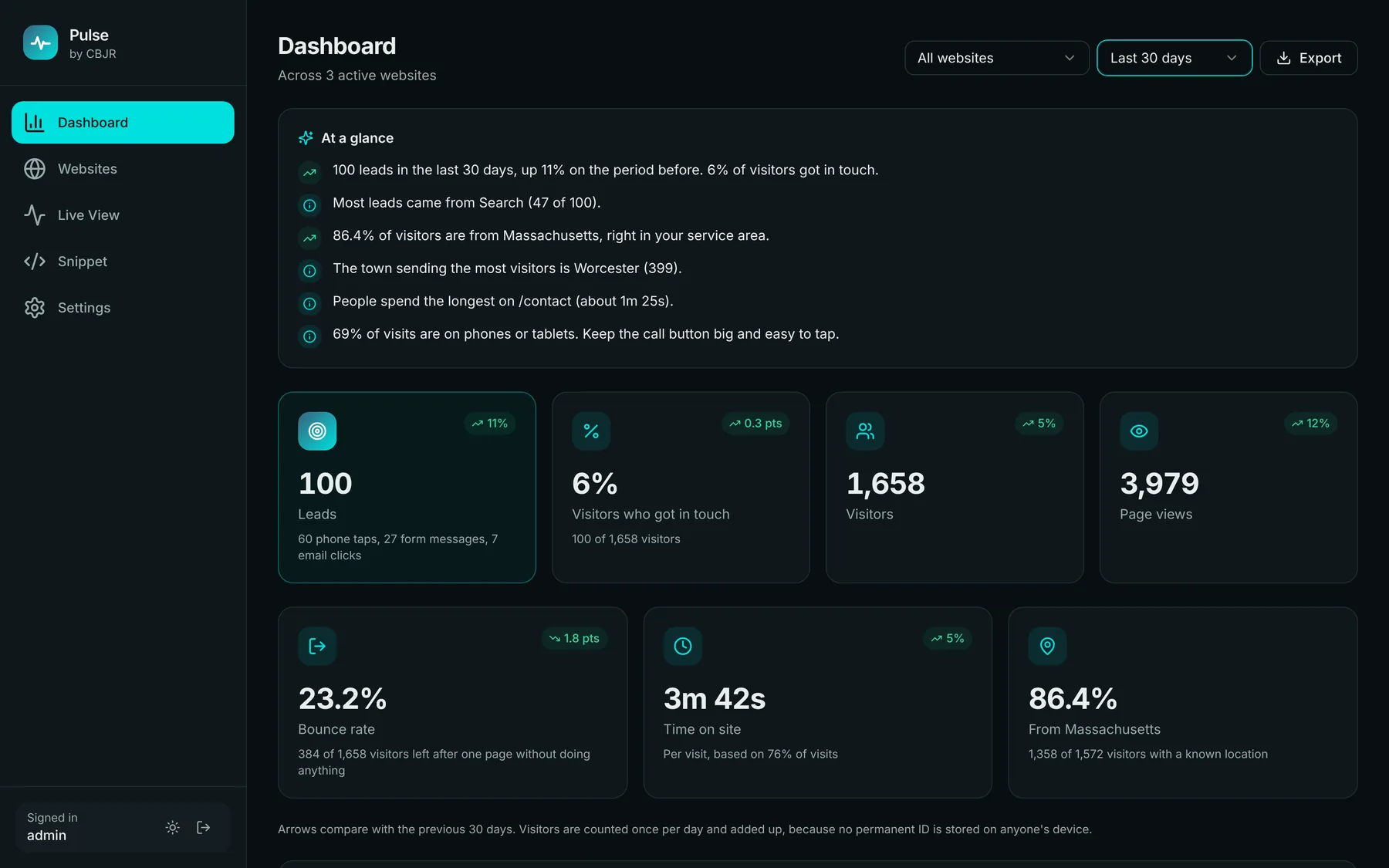
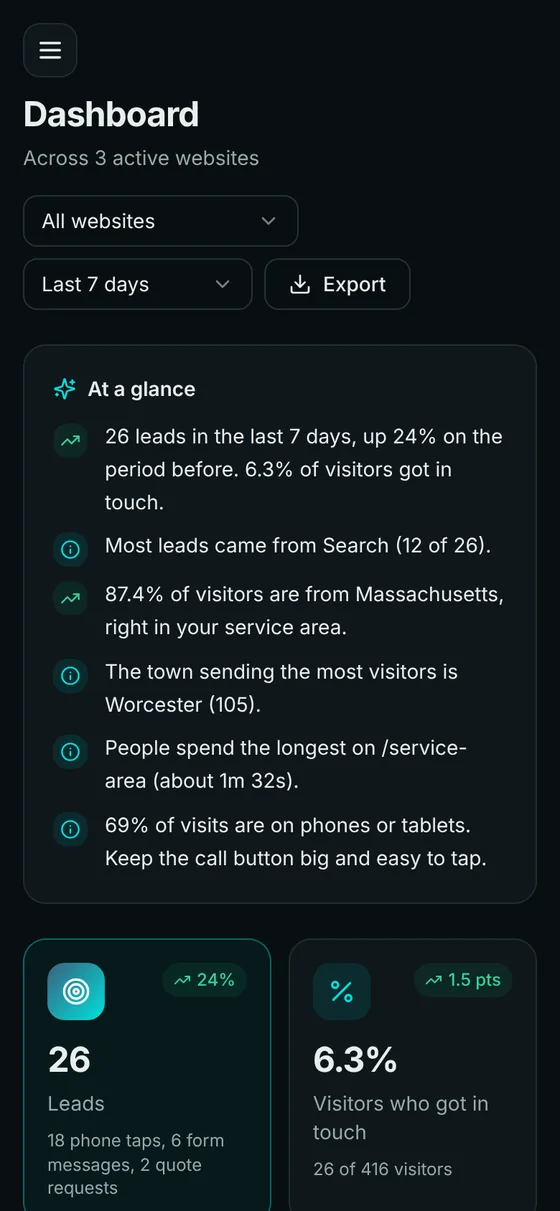
Most analytics tools bury you in charts. Pulse answers the questions you'd ask over coffee: did the website make the phone ring this month, and what's working?
Phone taps and email clicks are counted automatically, and one line counts contact forms and quote requests. You see the share of visitors who got in touch.
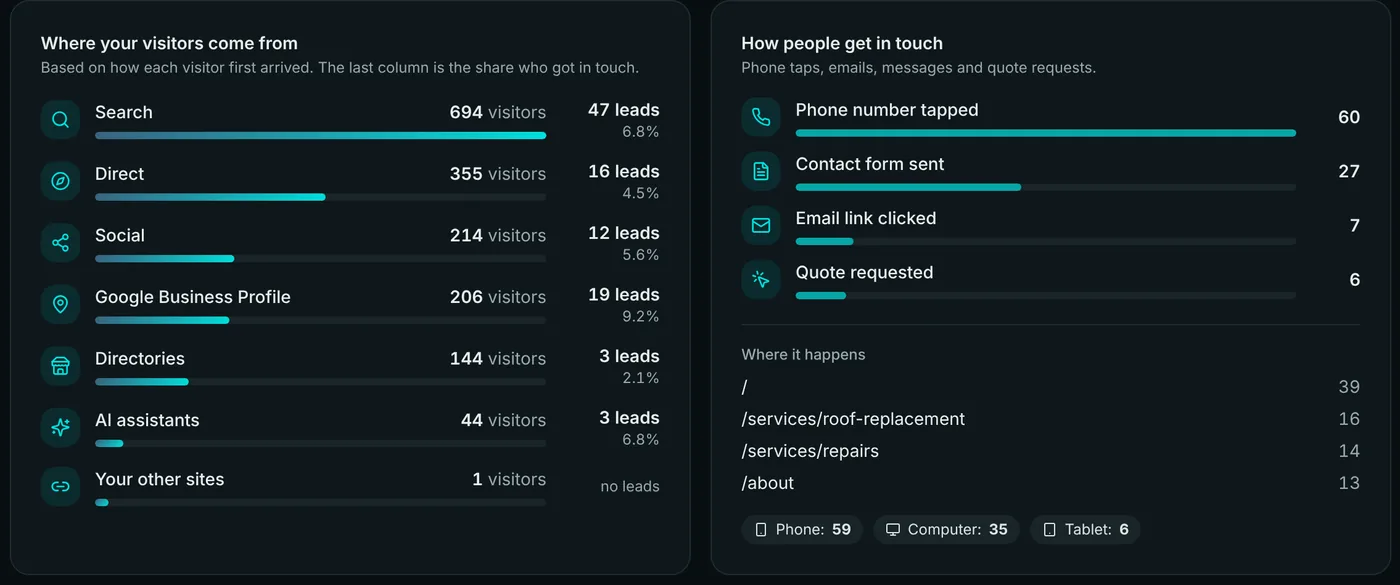
Search, your Google Business Profile, Facebook and Nextdoor, Yelp and Angi, even ChatGPT. Each one shows how many visitors and leads it sent.
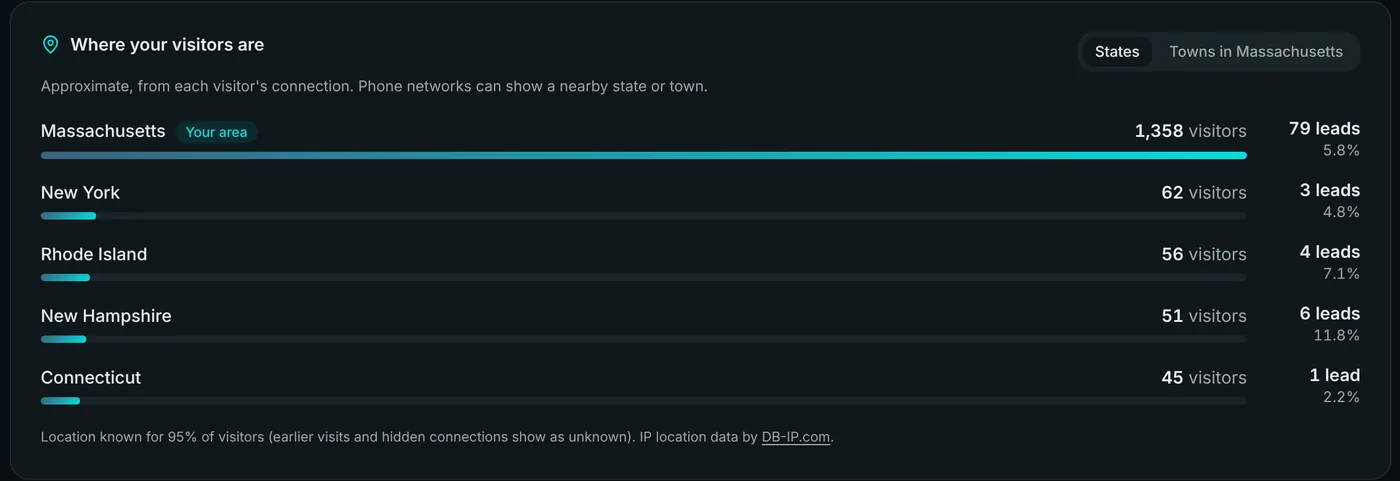
See which states and towns your visitors are in, and how many are actually local. Worked out on your own server, no outside service.
Watch visits arrive as they happen, updated every 5 seconds, with a feed of the latest leads across all your sites.
"100 leads, up 11%." "Most leads came from Search." Pulse spells out what changed, and stays quiet until there's enough data to mean something.
Track several websites from one dashboard, compare against last month, export to a spreadsheet, and use it in light or dark mode.
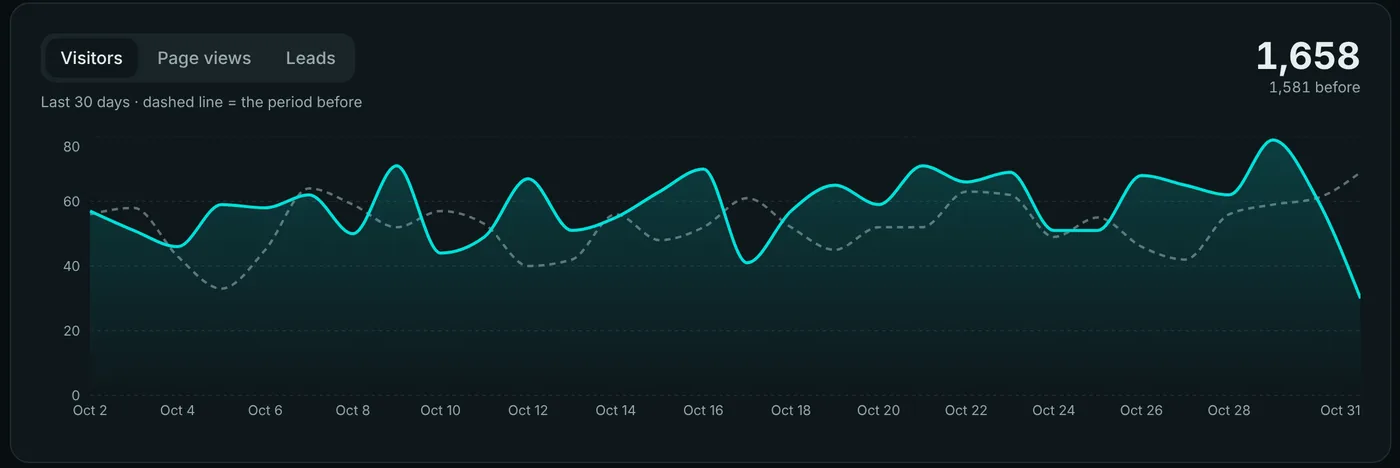
The dashed line is the period before, so you can see straight away if things are getting better or worse. Switch between visitors, page views and leads.
Every source shows its visitors, its leads and the share who got in touch. And see exactly how people reached out, and from which page.
Set your home state and Pulse shows what share of visitors are in your service area, broken down by town.
See who's on your sites right now and every lead as it comes in. Leave it open on a second screen; it keeps itself up to date.
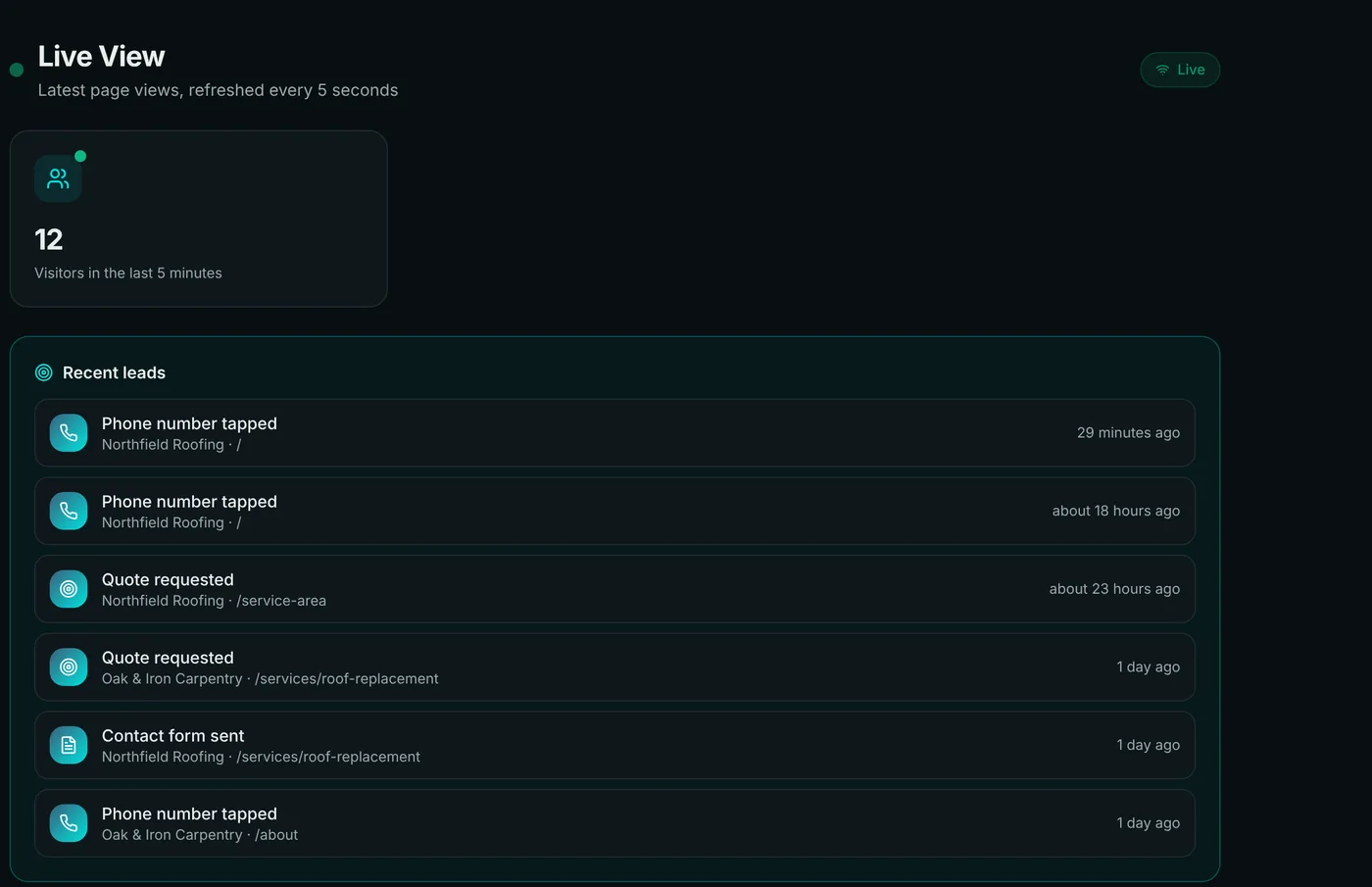
Screenshots use made-up demo businesses and numbers.
Your customers' visits are your business, not an ad company's. Pulse counts what you need and throws away what you don't.
Pulse runs on your own hosting with your own database. Nothing is sent to me or anyone else. If you delete it, the data is gone.
| Pulse | Typical free hosted analytics | |
|---|---|---|
| Where the data lives | Your own server | The provider's servers |
| Cookies on your visitors | None | Usually |
| Counts calls and form messages | Built in | Extra setup |
| Directories, Nextdoor and AI assistants | Named for you | Lumped into "referral" |
| Monthly cost | $0 | Free, paid for with your data, or a monthly plan |
If your hosting has cPanel with Setup Node.js App (Namecheap, A2 and many others do), you already have everything Pulse needs. The download includes a step-by-step guide.
Grab the zip below. It's about 5 MB and includes the full guide.
One empty MySQL database in cPanel. Two minutes, and the guide shows each click.
Upload, then run npm run setup. It asks a few questions and does the rest.
Paste the snippet into your site's <head>. Visits show up within seconds.
<script defer src="https://stats.yoursite.com/t.js" data-site="pulse_…"></script>That's the whole thing on your website. WordPress, plain HTML, React and most site builders.
Everything you need to run Pulse on your own hosting: the dashboard, the tracking script, the database setup and the install guide.
Download Pulse 2.3.0By downloading you agree to the license on the right. Questions? creigboydjr@thehandydev.com
Pulse by CBJR: Personal Use License
Copyright (c) 2026 CBJR. All rights reserved except as granted below.

1. WHAT YOU MAY DO (free of charge)
   You may download, install and run Pulse ("the Software"), and change it for your own needs,
   to measure visits to websites that you own or run yourself, including the website of your own
   business or organization.

2. WHAT YOU MAY NOT DO without written permission from CBJR
   a) Sell, rent, license or sublicense the Software, or charge anyone for access to it.
   b) Give, publish or share copies of the Software, changed or unchanged, with anyone else.
      (Point people to the official download page instead: https://thehandydev.com/pulse/)
   c) Run the Software as a service for other people or clients, for example tracking websites
      you build or manage for customers.
   d) Remove or hide the "by CBJR" credit or this license.

3. YOUR DATA
   The visit data the Software collects belongs to you and stays on your own server.
   CBJR receives no data from your installation.

4. NO WARRANTY
   THE SOFTWARE IS PROVIDED "AS IS", WITHOUT WARRANTY OF ANY KIND, EXPRESS OR IMPLIED, INCLUDING
   BUT NOT LIMITED TO MERCHANTABILITY, FITNESS FOR A PARTICULAR PURPOSE AND NON-INFRINGEMENT.
   IN NO EVENT SHALL CBJR BE LIABLE FOR ANY CLAIM, DAMAGES OR OTHER LIABILITY ARISING FROM, OUT OF
   OR IN CONNECTION WITH THE SOFTWARE OR ITS USE. You are responsible for following the privacy
   laws that apply to your website and visitors.

5. ENDING
   This permission ends automatically if you break these terms.

6. OTHER PEOPLE'S WORK INCLUDED
   - Visitor-location data: DB-IP.com "IP to City Lite", CC BY 4.0 (see server/data/GEO-LICENSE.txt).
   - Open-source libraries installed by "npm install" (such as Express and mysql2) and bundled in
     the dashboard (such as React) keep their own licenses (mostly MIT).

For other uses (client work, reselling, redistribution), contact CBJR:
creigboydjr@thehandydev.com  ·  https://thehandydev.com/pulse/
Yes, for websites you own or run yourself, including your own business. There's no trial, no account and no upsell inside the app. You only pay for your own hosting, and most cPanel plans already include what Pulse needs.
No, but you should be comfortable clicking around cPanel. The guide walks through every step with what you should see, and npm run setup writes the settings file for you. If you'd rather not, ask me about setting it up.
No. The tracking script is under 8 KB, loads after your page, and sends a tiny message in the background. Your visitors won't notice it.
It works with any site where you can add a line of code to the <head>: WordPress (with a header-scripts plugin or your theme settings), plain HTML, React and other site builders that allow custom code. Pulse itself needs hosting that can run Node.js, which is separate from where your website lives.
Pulse itself sets no cookies and stores no IP addresses, so it doesn't add a reason for one. You should still mention analytics in your privacy policy. I'm not a lawyer, so check the rules where you and your visitors are, especially if you have visitors in Europe.
Some visitors use ad-blockers, and Pulse respects "Do Not Track" by default. So treat the numbers as a minimum. You also won't see your own visits once you use the "ignore my visits" link.
Not under the free license. If you build or manage sites for customers and want to use Pulse for them, email me at creigboydjr@thehandydev.com and we'll work something out.
New versions are posted on this page. Updating takes a couple of minutes: replace two folders and click Restart. Your data and settings stay put.
I build fast, hand-coded websites for the trades. Ask about getting Pulse set up and connected to your site.